


Google Voice
4.2116.32K Reviews
App Specs
- Version
- 2026.07.12.946458730
- Updated On
- License
- Free
- Downloads
- 10,000,000+
- Developer
- Google LLC
- Categories
- Communication
- Platform
- Android, iOS
Screenshots
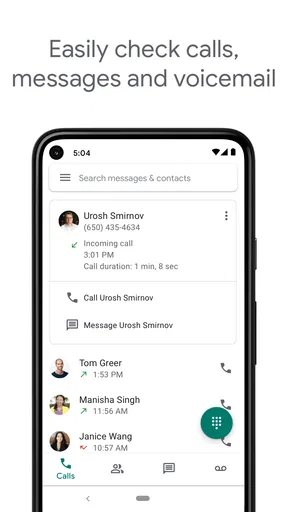
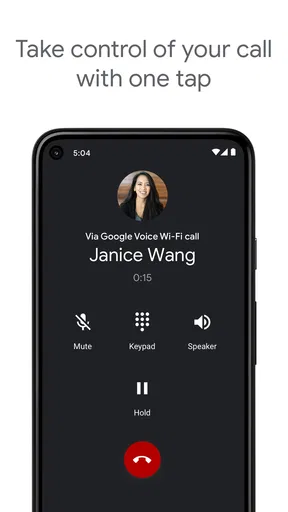
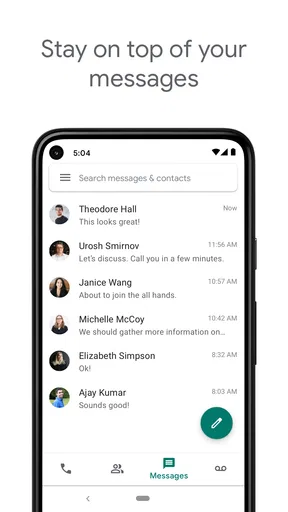
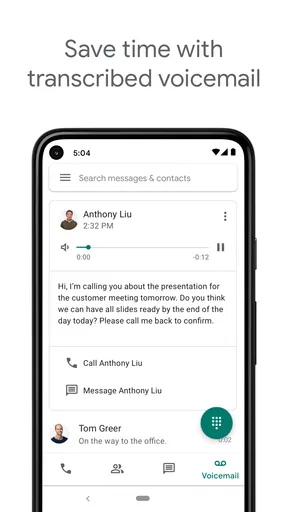
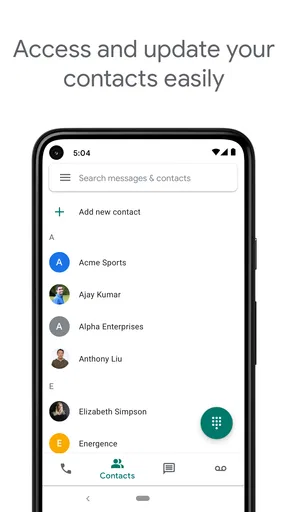
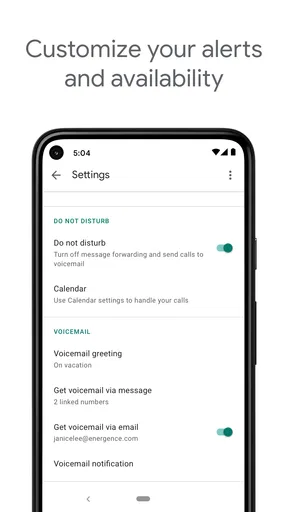
 Analysis by AppCompare
When I first consider a second number, I ask one practical question: will it make my day easier, or give me another inbox to manage? Google Voice is most useful when you want a separate number for calls, texts, and voicemail without carrying another phone. I’d treat it as a communication tool to set up around a clear purpose—work inquiries, a side project, or keeping a public-facing number apart from your personal one—rather than as a replacement for every part of my regular phone service.
What to expect from a cloud-based number
This is a free communication app from Google LLC, with an Everyone age rating. It has a 4.2 average from around 368,000 ratings, and more than 10 million installs. Those figures suggest it has found a broad audience, but the better question is whether its separate-number approach fits your routine. If you already use Google services, the familiar account-based setup may feel convenient; if you prefer to keep communication outside that ecosystem, it may feel like one more account to maintain.
Think of the number as a layer between you and the people contacting you. It can help you decide which calls should reach which devices and when, while giving you a distinct number to share. That separation can be valuable, but it depends on actually using the number consistently. If you give it out once and then forget to check its messages, the extra layer becomes a source of missed communication instead of a useful boundary.
Make the first setup serve a real purpose
Before installing, decide what you want the number to do. For example, you might use it for a small business, a volunteer role, or listings where you don’t want to publish your everyday mobile number. That decision makes the setup easier to judge: you’ll know which calls belong there, which devices should ring, and what kind of voicemail greeting makes sense. Google Voice is available free, though international calls can cost money, so check the relevant calling terms before making overseas calls.
Install the current Android release, version 2025.11.30.839328256, if your device runs Android 8.0 or newer. Once you’re in the app, follow its prompts to configure the number and call handling. I’d make a test call and send a test text before sharing the number widely. That simple trial helps you confirm that you can find the right conversation and recognize which number is being used, rather than discovering a mix-up during an important exchange.
Get one useful result before customizing everything
Your first meaningful win can be modest: share the new number with one trusted contact, receive a call, and let a voicemail arrive. Then check how the message appears and whether its transcription gives you enough context to respond. I find it more reassuring to test the full path—from contact to call to follow-up—than to change every setting at once. If something behaves differently from your usual phone calls, you can isolate the cause instead of wondering which of several new rules created the confusion.
After that test, decide whether forwarding is actually helping. A second number is not automatically a second phone, and forwarding calls to your everyday device can keep things simple. But if every call rings everywhere, the separation you wanted may disappear. Start with a narrow rule, such as allowing important contacts through at particular times, and adjust only after you see how it affects your day. The point is control, not building a complicated system for its own sake.
Worth Reading Before You Choose

EA SPORTS FC Mobile 26 Is a Bigger Football Game, but It Takes Time

Flipboard Shows What News Apps Must Do Beyond the Feed

Switching to Android Auto Means Rethinking Your Driving Routine

Google Calendar Makes a Crowded Week Easier to Manage

Ludo King Makes the Most of the Minutes Between Plans

Baby Panda World Brings Quick Play to Modern Phones, but Its Game Library Feels Busy
Small habits that prevent common mix-ups
One easily overlooked detail is voicemail transcription: it is handy for scanning a message when you can’t listen, but I wouldn’t treat a transcript as a perfect substitute for the recording. Names, addresses, or a quick callback number are exactly the details I’d double-check by listening when the message matters. Transcription is best as a preview that helps you prioritize, not as the only record you rely on.
I’d also keep the number’s purpose visible to the people who need it. If you use it for work, put it in the signature or profile where clients expect to find it, and use the same number when you return those calls. That makes the separate identity meaningful. For a personal project, tell close contacts which number is best for urgent replies; otherwise they may message your regular number out of habit, leaving you to monitor both.
When another communication option makes more sense
Compared with using your carrier’s regular number, Google Voice offers a distinct number and flexible call handling, which can make boundaries easier to maintain. A normal mobile number may be the simpler choice if you want one inbox and don’t need a separate identity. Messaging apps can be more convenient when the people you contact already use the same service, but they usually organize communication around accounts or app contacts rather than giving you this particular phone-number workflow.
It is also not a magic privacy shield. Sharing a separate number can reduce how often you hand out your main one, but it does not make every interaction anonymous or remove the need to protect your Google account. Two-step verification is a sensible safeguard, and I’d still use a strong account password and review who can access any device where you stay signed in. If your priority is avoiding another account-linked service altogether, a second carrier line may suit you better, even if it means managing another plan or SIM.
A realistic day with the second number
Imagine you’re arranging a repair and need to post a contact number on a local listing. You can give the listing your Voice number, keep your personal number private, and let calls reach the phone you already carry. If you’re in a meeting when the repair person calls, a voicemail transcription can tell you whether the message is about scheduling or something that needs attention. Later, you can listen to the original message if a detail is unclear, then return the call using the number you chose for that purpose.
This workflow is especially useful for people whose contact details move between contexts: freelancers, community organizers, caregivers coordinating appointments, or anyone testing a small project. It is less appealing if you need every call to work exactly like a traditional carrier line in every circumstance, or if you cannot reliably check another message stream. Before relying on it for time-sensitive work, try the precise calling and forwarding pattern you expect to use and keep a backup contact method for critical conversations.
Why Google Voice Stands Out
First off, let’s talk about the versatility. Google Voice gives you a unique phone number that can be used for calls, texts, and voicemails. This is perfect if you’re like me and want to keep your personal and work life separate without juggling two phones. The app seamlessly integrates with other Google services, which is super handy if you’re already in the Google ecosystem.
The call quality is top-notch. I’ve tried it over various networks and Wi-Fi, and it consistently delivers clear and crisp calls. There’s something incredibly satisfying about being able to talk to someone on the other side of the globe without that annoying lag or distortion.
Features That Make Life Easier
One of my favorite features is voicemail transcription. Instead of listening to long-winded messages, I get a text version sent directly to my inbox. It’s a real time-saver, especially if you’re in a meeting or somewhere you can’t listen to voicemails.
The app also lets you customize how calls are forwarded. You can set up rules for different contacts, so maybe your boss’s calls get forwarded to your work phone while your family’s calls ring through to your cell. It feels like having a personal secretary at your fingertips.
And for all you texters out there, the messaging feature doesn’t disappoint. It’s straightforward and easy to use, and you can send texts from any device, as long as you’re logged into your Google account. It’s perfect for those moments when your phone is charging in another room.
Privacy and Security
Now, I know privacy is a big concern for many of us. Thankfully, Google Voice offers two-step verification to keep your data secure. Plus, because it’s a Google product, you can trust that they take security seriously. I’ve felt pretty confident knowing my communications are protected.
It’s also worth mentioning that the app is free to use in the U.S. for most features. International calls do incur a charge, but they’re generally cheaper than using a regular phone line. It’s perfect for staying in touch with friends or family abroad without breaking the bank.
Final Thoughts
Overall, Google Voice is a fantastic tool for anyone who wants more control over their communication. It’s packed with features that make life easier, and the integration with other Google services is the cherry on top. Whether you’re a busy professional or just someone who loves staying connected, Google Voice is definitely worth checking out.
So, if you’re ready to give it a whirl, head over to the Play Store or App Store, download it, and see how it transforms your phone experience!
Pros
- Seamless integration with Google services.
- Free calls to numbers in the U.S.
- Voicemail transcription feature.
- Customizable call forwarding settings.
- Works on multiple devices simultaneously.
Cons
- Limited international calling features.
- Requires a Google account to use.
- No emergency calling capabilities.
- Call quality can vary on mobile data.
- App interface feels outdated.
FAQs for Google Voice
What is Google Voice and how does it work?
Google Voice is a telecommunication service that provides users with a unique phone number for calling, texting, and voicemail. It works by routing calls through the internet, allowing you to manage communications from your smartphone or computer. This service is particularly useful for consolidating personal and work contacts while also offering features like call screening and voicemail transcription.
Is Google Voice free to use?
Google Voice offers free and paid options. Domestic calls and texts within the U.S. are generally free, but international calls might incur charges. Users should be aware of potential costs associated with using their mobile data for calls and texts. Always review Google’s pricing details for the most accurate and current information regarding charges.
Can I use Google Voice on multiple devices?
Yes, Google Voice can be used across multiple devices, including smartphones, tablets, and computers. You can access the service through the Google Voice app or web browser, ensuring seamless communication regardless of the device you are using. This flexibility is ideal for users who need to stay connected across different platforms.
Does Google Voice work internationally?
Google Voice can be used internationally, but it primarily functions within the U.S. For international calls, users will need to purchase credits. While you can receive calls and texts abroad, making international calls requires checking Google’s rates. Additionally, it’s important to have a stable internet connection for optimal performance.
How secure is Google Voice?
Google Voice implements several security measures to protect user data, including encryption and two-factor authentication. However, users should always be cautious with sensitive information shared through calls or texts. Regularly updating passwords and monitoring account activity are recommended practices to enhance security.


